How it works
Your machine does the work. Your node is left alone.
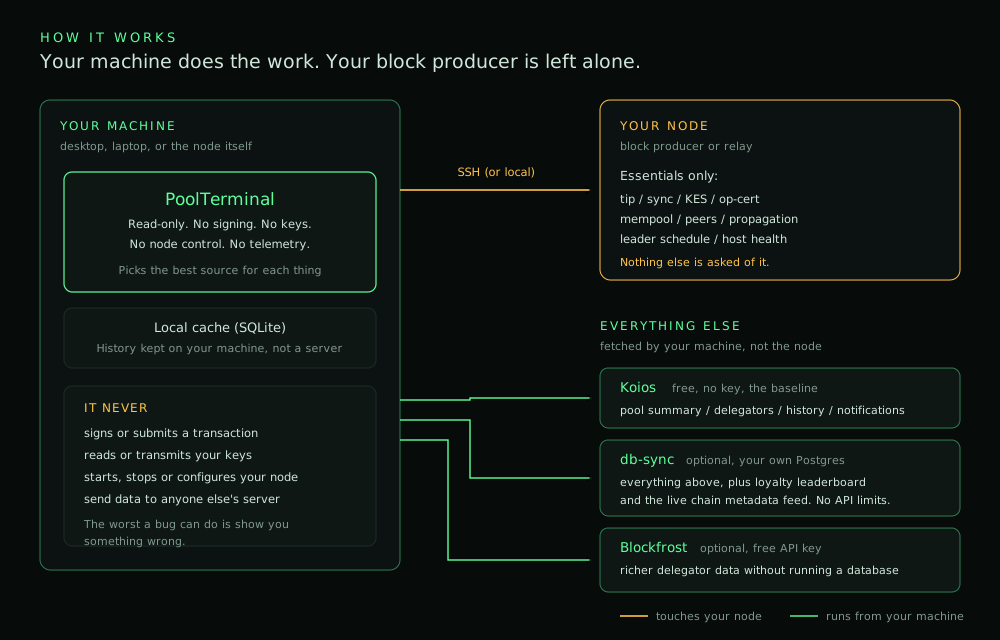
PoolTerminal polls your block producer only for the things that can come from nowhere else. Everything else is fetched by your own machine, so the node stays free to do its job.
Download, make it executable, run it. The setup wizard does the rest.
PoolTerminal runs every day against a live block producer, but it is early software and I do not expect it to be working 100% yet. It has really only been exercised on one operator's setup: mine. Every pool is different.
If you are an SPO, the most useful thing you can do is run it, try to break it, and tell me what went wrong. Report a bug ↗
It is read-only by design: it does not sign, spend, or change anything on your node, and it holds no key material. That limits what a bug can do, but it is not a guarantee. The app holds SSH access to your block producer, so treat it as you would any tool with that access: give it a dedicated SSH user with the narrowest permissions that work, and read the code before you run it.
No warranty. This software is provided as-is under Apache 2.0, with no warranty or guarantee of any kind, express or implied. It has had an AI-assisted code review, not an independent or human security audit - see the security policy. You use it at your own risk, and you are responsible for satisfying yourself that it is safe to run in your environment.
Grab the AppImage from GitHub Releases. No installation, no dependencies, runs anywhere. On Debian or Ubuntu you can take the .deb instead and get a menu entry with it.
PoolTerminal_0.4.1_amd64.AppImage or PoolTerminal_0.4.1_amd64.deb · SHA256SUMS · x86-64 Linux · Apache 2.0. Free. Release notes ↗4a05d47cda879ff32e578e92c1d6d71fa7c175c8b1da051350b522818a36fbd13e256b4ef6b61bdbf63c1e270d19d698180fd6b8da42f8db6e7f3be2fd0035a7sha256sum PoolTerminal_0.4.1_amd64.* before running. Requires cardano-node 11.1.2 or later with cardano-cli 11.2.3.0 or later.chmod +x PoolTerminal_0.4.1_amd64.AppImage ./PoolTerminal_0.4.1_amd64.AppImage
Or, if you took the .deb:
sudo apt install ./PoolTerminal_0.4.1_amd64.deb
poolterminal
That's it. If it won't start, see the troubleshooting section below.
The setup wizard walks you through it: point it at your node over SSH (or run it on the node itself), and optionally add db-sync or Blockfrost for richer data. You only need your node and an internet connection to get going.
Not ready to connect anything? Demo mode lets you explore the entire interface with synthetic data and no node at all.
PoolTerminal polls your block producer only for the things that can come from nowhere else. Everything else is fetched by your own machine, so the node stays free to do its job.
The quick install above is all most operators need. Open these if you want the detail.
That is genuinely all. db-sync and Blockfrost are optional extras, not requirements.
PoolTerminal reads from your node the same way you would: by running standard read-only queries over an SSH session, or locally if it is running on the node itself.
Over SSH (most common). You give it the host, port, username, and either a key or a password. Keys are found automatically in your .ssh directory. Key passphrases are never stored. Two-factor prompts are supported.
On the node itself. If you run PoolTerminal on the same machine as the node, no SSH is needed at all.
The host key is checked on first connection and remembered. If it ever changes, the connection is blocked and you are told, so a machine-in-the-middle cannot quietly take its place.
If you already run cardano-db-sync, PoolTerminal can query it directly. This unlocks the fullest data: complete epoch history, the delegator loyalty leaderboard, per-delegator deep-dives and the live chain metadata feed, with no API rate limits.
The wizard has a guided path for this. It can connect to a local Postgres, or tunnel to a remote one over SSH. It can even generate and authorise an SSH key for you if you do not have one.
Point it at a read-only role with a password (SELECT grants only); the wizard shows the commands to create one. PoolTerminal never writes to your database. If you do not tick "Remember", it asks for the database password each time it starts - "Remember" stores it unencrypted on this computer, so use a read-only role.
For db-sync on another machine, restrict the SSH key PoolTerminal uses to the database tunnel only - see Securing the db-sync SSH key. Enter the SSH port of that machine; it is not assumed to be 22.
A free Blockfrost API key gives you richer delegator and history data without running a database. Paste the key into the wizard, or add it later in Settings.
The free tier is generous and PoolTerminal shows you your usage so you can see where you stand.
Alerts reach your phone with nothing installed on your block producer. There is no agent, no cron job and no monitoring stack to keep patched - PoolTerminal already receives this data every poll cycle, so it simply forwards it.
The setup is three steps, guided in the app: create a bot with @BotFather, paste the token into the Alerts tab, and PoolTerminal detects your chat ID automatically once you message the bot. Every alert has a Test button, so you can see exactly what it looks like on your phone before you rely on it.
Six alerts ship today - KES expiry, node stall, block minted, slow propagation, mempool full (2+ blocks queued) and low peers - each toggled independently with its own threshold. A global cooldown and optional quiet hours stop a flapping condition becoming a night of buzzing.
Alerts fire while PoolTerminal is open. That is deliberate: it is built for an always-on desktop, and it means no agent and no extra attack surface on the BP.
On the token. Your bot token is stored unencrypted in PoolTerminal's app-data directory so alerts survive a restart. It controls only the bot you created - it cannot reach your node, your keys or your funds. It travels to Telegram as an HTTPS header from the Rust backend, so it never appears in a command line on your node.
Never stored. SSH passwords, OTP codes and SSH key passphrases live in memory for the session only, in every mode. That is the one credential that could actually reach your node, so PoolTerminal asks you again rather than keep it.
Stored, on purpose, unencrypted in ~/.local/share/com.gnp1.poolterminal/: a Koios API key if you use the keyed tier, a Blockfrost project key if you add one, your Telegram bot token if you set up Alerts, and your db-sync password only if you ticked "Remember" (in the setup wizard or the startup password prompt). They persist because those features would otherwise stop working every time you close the app.
None of them can touch your pool. Koios and Blockfrost keys read public chain data; the Telegram token controls only your own bot; the db-sync password reads your own local database. Anyone who can read those files can already read everything else in your home directory.
If you would rather store none of them: use the free Koios tier, leave Blockfrost and Alerts unconfigured, and leave the db-sync "Remember" box unticked - PoolTerminal then asks for the password at each start. The app is fully functional that way.
If you would rather not trust a binary, do not. Build it yourself. That is the whole point of it being open.
You need Rust, Node.js, and the Tauri 2 Linux prerequisites.
# clone
git clone https://github.com/GNP1-dev/PoolTerminal.git
cd PoolTerminal
npm install

# run in development
cargo tauri dev

# or build release bundles
cargo tauri build
Bundles land in src-tauri/target/release/bundle/.
AppImages need FUSE. Most desktop Linux has it, but some newer or minimal installs do not.
Either install it:
sudo apt install libfuse2
Or run without it:
./PoolTerminal_0.4.1_amd64.AppImage --appimage-extract-and-run
Still stuck? Open an issue ↗ and tell me what happened.
Planned, and they will be free. They will also be unsigned: PoolTerminal is a hobby project for SPOs, not a commercial product, so it does not carry a code-signing certificate.
That means Windows (SmartScreen) and macOS (Gatekeeper) will warn you that the developer is unidentified. That warning is expected. You can click through it, or build it yourself from source. Nothing is hidden.