PoolTerminal

The pool operator's
operational terminal.

A Bloomberg-terminal-style desktop dashboard for Cardano stake pool operators. It connects to your own node and surfaces the operational data that's otherwise locked away in logs, databases, Prometheus endpoints and cardano-cli.

DenseReal-timeRead-onlyRuns on your machine

Beta software, no warranty.

PoolTerminal is early software and has mainly been exercised on one operator's setup. It is read-only by design and holds no key material, but it does hold SSH access to your block producer, and that limit is not a guarantee. It has had an AI-assisted code review, not an independent security audit. Provided as-is under Apache 2.0 with no warranty of any kind - you use it at your own risk. See SECURITY.md.

Linux · AppImage or .deb. This is beta software running daily against a live block producer — expect rough edges, and tell me what breaks.

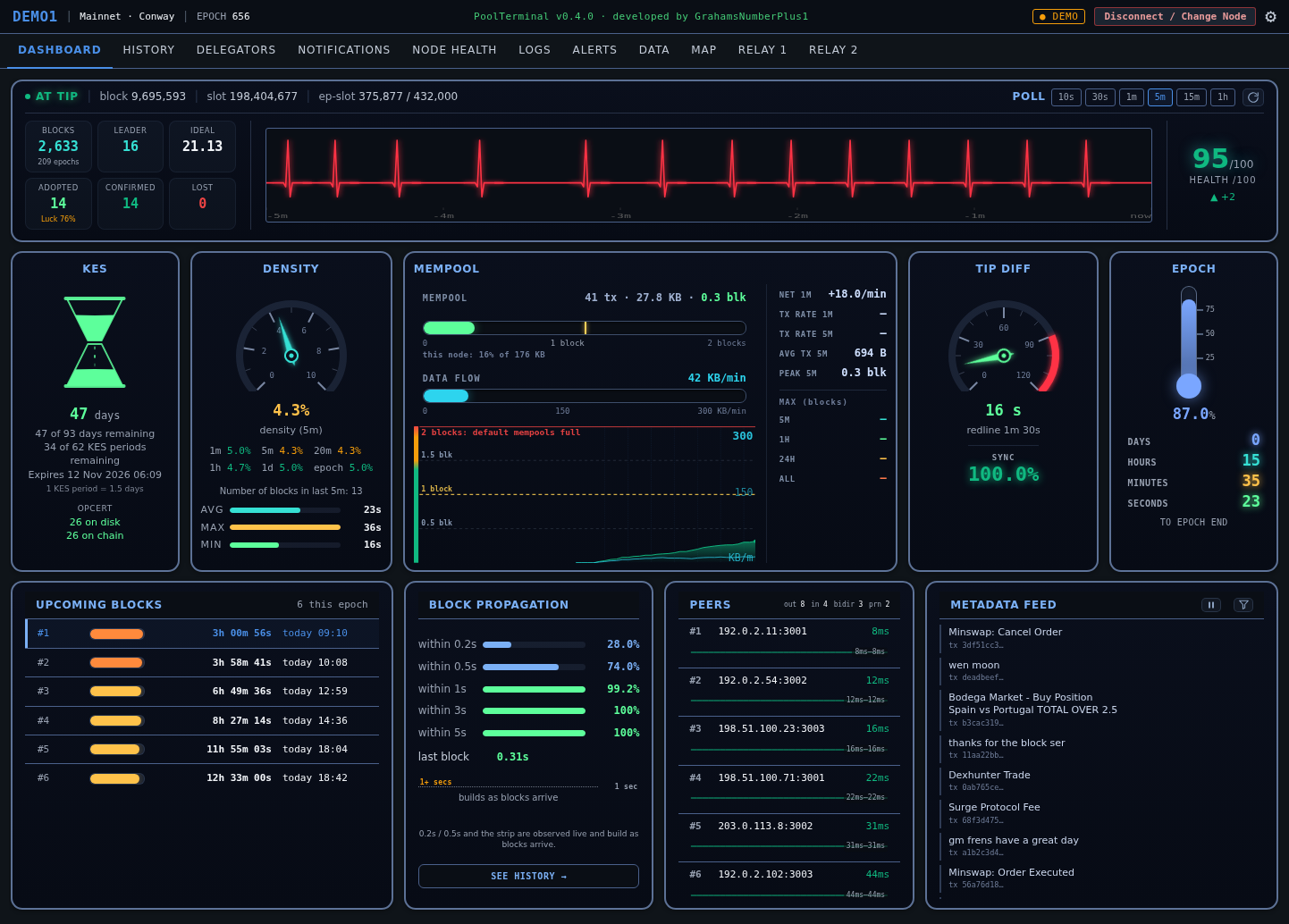
The PoolTerminal Dashboard view in Demo mode
The Dashboard view in Demo mode - every figure is synthetic, no node behind it. See the full gallery for every view.
What it is

Everything your pool is doing, in one place.

Running a Cardano stake pool produces a torrent of operational data. Existing tools surface a fraction of it. PoolTerminal pulls it all together, visualises it properly, and stores history locally so you can see trends over weeks and months - not just snapshots.

01 / DENSE

Data nothing else surfaces

Op-cert counter health, sub-second block propagation, real transaction-demand flow, delegator loyalty rankings, per-epoch reward splits down to your own SPO earnings.

02 / READ-ONLY

Your keys never leave your node

No transaction signing. No key access. No node control from the GUI. PoolTerminal observes and reports - it does not act. It stores nothing on anyone else's servers.

03 / YOURS

Runs on your machine

A desktop app that connects to your node over SSH, or runs on the node itself. History is cached locally. Optionally enriched by your own db-sync, Koios, or Blockfrost.

Who it's for

Built for Stakepool Operators.

If you run a Cardano stake pool and want to see what's really happening - beyond gLiveView and generic chain explorers - this is for you. Whether you're chasing a missed block, watching a delegation shift, or just keeping an eye on KES and mempool, it's the operational view SPOs have been missing.

Release · 29 September 2026

New in v0.4.1.

db-sync on another machine now keeps working after a restart, and PoolTerminal writes far less to disk.

FIXED

db-sync over SSH survives a restart

The connection test passed, but after restarting PoolTerminal quietly used Koios instead. The setup wizard now keeps your saved db-sync settings, asks for the database password at startup if it is not remembered, and the "Remember" option sits right under the password field.

FIXED

db-sync failures say why

If db-sync is set up but cannot connect - a wrong password, a missing key file, an SSH problem - Delegators, the Data tab and History now say so, with the real reason and a Retry button, instead of silently falling back to Koios.

FIXED

SSH key paths

"~" in a key path now works, and key files are checked when you enter them: a missing or unreadable file, or a key that needs a passphrase, is reported with its path.

IMPROVED

Steadier SSH connections

SSH connections use keepalives, so a dropped link is noticed instead of hanging, and a dropped db-sync tunnel reconnects once by itself.

IMPROVED

Much less disk writing

A few values were rewritten many times a minute, growing a local storage file to around 1 GB on some installs. They are now smaller and saved about once a minute; the large file is cleared the next time PoolTerminal starts.

CHANGED

Safer db-sync setup

Setup help recommends a read-only database role with a password, and the SSH port is no longer assumed to be 22. "Remember" stores the password unencrypted on this computer; a system keyring is planned for 0.5.0.

Release · 25 September 2026

New in v0.4.0.

Support for cardano-node 11.1.2, and Ideal and Luck figures you can rely on.

BREAKING

Requires cardano-node 11.1.2

This release needs cardano-node 11.1.2 or later with cardano-cli 11.2.3.0 or later, as a matched pair from the same node release, and cncli 6.8.0 or later if you use cncli. Older versions are not supported. If your updated Guild scripts refuse an older node, PoolTerminal now shows their message when you connect, instead of connecting with no pool ID.

FIXED

Ideal and Luck use the right stake snapshot

Ideal was worked out from the stake snapshot used for rewards, not the one that decides this epoch's leader slots, so Ideal and Luck were off by however much your stake had changed between the two - 0.82 instead of 0.98, for example. They now match cncli's leaderlog and gLiveView, and History rows saved with the old figure are corrected automatically.

CHANGED

The mempool is counted in blocks

The queue is shown as blocks waiting ("3.7 blk") on the dashboard, its chart and the relay tabs. The line that matters is 2 blocks: most pools run the default 2-block mempool, so from there new transactions may be rejected across the network. Figures turn amber approaching 2 and red at 2 or more. Your own node's capacity fill appears as a small secondary line.

FIXED

Logs presets cover their full window

On a busy block producer the presets only saw the last twenty minutes or so. They now filter first, so "Restarts & startup" and "Errors & warnings" really cover their time windows, and they work on nodes that log JSON.

FIXED

Clear errors instead of silent failures

A Guild env that fails is reported at connect. Every cardano-cli query has a time limit, so a mismatched cli and node can no longer freeze the dashboard. Key and certificate file paths are no longer written to logs or error messages.

FIXED

db-sync 13.7.2.1 tested

Tested with db-sync 13.7.2.1 (schema 15.50.6), and the delegator deep-dive is about 2 seconds faster on it. A schema PoolTerminal hasn't been tested against is flagged "verify" on the Data tab and in History.

Release · 9 September 2026

New in v0.3.4.

PoolTerminal no longer pins a CPU core while it is open. Same display, a fraction of the CPU.

FIXED

The dashboard was repainting sixty times a second

Three animation loops rewrote the page on every frame whether or not anything had changed, and the heartbeat's glow was re-blurred on each one. The web process sat at 100-135% CPU for as long as the app was open: fan noise and battery on a laptop, and on a desktop that also runs a node, CPU the node does not get. Motion now runs at 1 Hz, a write is skipped when nothing changed, the glow is applied once to the trace rather than to every moving beat, and the gauges, flashes and bars step instead of gliding, so a value changing every second no longer keeps the page repainting every frame. Measured on the release build on the same machine: from an average of 135% of a core to a few percent.

FIXED

Everything pauses while the window is hidden

Minimise PoolTerminal or cover it and the ticker and every animation stop. Nothing is spent painting a window nobody can see; it repaints the moment you come back.

FIXED

Forge card no longer cries CHECK on healthy pools

It was treating the node's late-leader-check counter as missed blocks. Every block producer accrues those, and the node was almost never leader for them. The card now escalates only when the node was scheduled and could not mint.

CHANGED

Forge counts carry their denominator

Node Health reads "leader N · forged M", so a forged count of zero is seen against how often the node was actually scheduled. Live detail adds leader slots, cannot-forge errors and late leader checks as "n of total (%)".

Release · 28 August 2026

New in v0.3.3.

Demo mode now fills every view with one consistent synthetic pool, so you can see the whole app before you point it at a node.

NEW

Demo mode populates every view

One deterministic synthetic pool across every tab: 211 epochs of history, 107 delegators, two pending joiners, realistic luck, lost blocks and blockless epochs. The same numbers wherever you look. Stake addresses and transaction hashes are well-formed but resolve to nothing on chain.

FIXED

Nothing real reaches Demo mode

Three view-level caches could carry live values across a mode flip: the delegator list, the dashboard snapshot including upcoming leader slots, and the metadata feed. Logs kept real captured values, and About and Alerts rendered host and bot credentials. All cleared now, and background collectors stop when you switch.

FIXED

Demo mode makes no network calls

It was still geolocating your own IP and fetching a basemap from a CDN. The basemap is bundled now, which also means the map works offline in live mode.

FIXED

Reconnecting no longer restarts the wizard

Disconnecting returns you to the connect screen, prefilled from your saved configuration, so reconnecting is a single action. The wizard stays one click away in Settings for genuinely changing node or settings.

Release · 27 August 2026

New in v0.3.2.

New delegators are visible the moment they delegate, and a stack of honesty fixes.

NEW

Pending delegators appear immediately

A new delegation shows in the DELEGATORS list as soon as its certificate lands on-chain: dulled, marked with the epoch it activates, sorted with everyone else, and excluded from the pool's active totals until the snapshot makes it real.

FIXED

Pending stake reads correctly

The live balance shown for a not-yet-active delegator overcounted badly on db-sync installs, treating long-spent outputs as unspent. A 200k account read as 12M. It now matches the chain.

FIXED

The version comes from the binary

The UI now reads its version from the packaged app at runtime instead of hardcoded strings, which had drifted in three different places. What About says is now, by construction, what you are running.

FIXED

The setup wizard can be closed

Re-running the wizard from Settings now offers a close control, and Esc does the same. Cancelling writes nothing: your existing configuration is left exactly as it was.

Release · 27 August 2026

New in v0.3.1.

One fix, shipped on its own because of what it could have hidden.

FIXED

Op-cert counters refresh live

After a KES rotation the dashboard kept showing the op-cert counters read at connect time, next to KES fields that refreshed correctly. An operator could rotate, see the timer reset and two matching counters, and wrongly conclude the rotation was clean. Both counters now come from the same 60-second query as the KES fields, the panel shows when the reading was taken, and a failed query shows an explicit unknown instead of a stale number. The health rule also now accepts disk ahead of chain by any margin, which is the normal state for a pool that rotates more often than it mints.

Release · 4 August 2026

New in v0.3.0.

A correctness release for delegator figures rather than new surface area.

FIXED

Transfers appear in movements

A stake account's movements now show the ADA actually moved in and out per transaction. Previously only rewards and withdrawals were listed, so a plain transfer appeared nowhere.

FIXED

The snapshot is labelled honestly

The per-epoch active-stake table no longer presents the next epoch's already-taken snapshot as though it were the current one.

Release · 30 July 2026

New in v0.2.0.

Two new workspaces, a redesigned KES gauge, and delegator figures that now reconcile against live account state.

NEW

The LOGS workspace

Journal queries, your full minted-block history from CNCLI or db-sync, a persisted propagation record that catches slow blocks long after they scroll away, and an epoch-transition view that renders a fork boundary as something you can actually see.

NEW

ALERTS on Telegram

Six alerts to your phone with nothing installed on your block producer. Guided three-step setup, a Test button on every alert, per-alert thresholds, cooldown and quiet hours.

NEW

The KES hourglass

Key expiry as a volume-correct hourglass whose sand drains as the key ages, warming toward red as expiry nears, with the on-disk vs on-chain op-cert counter beneath it.

FIXED

Delegator balances reconcile

Per-epoch active stake and live balance are both shown and labelled, so a figure that reads a little under Cardanoscan is explained. Includes a real db-sync bug: rewards live in two tables, and summing only one drove totals negative after a treasury payout.

FIXED

The epoch boundary

A genuine payment landing in the same window as the epoch reward roll no longer gets swallowed - it fires, labelled excl. epoch reward.

HONEST

Credential storage, stated plainly

The old "secrets are never persisted" claim wasn't true. What's stored, where, and what each key can actually reach is now spelled out in the README, in SECURITY.md, and at the point you type the token.

The views

Eleven tabs, one terminal.

Each tab is a focused, live operational view. Everything repaints instantly from cache when you return to it, refreshing live behind.

DASHBOARD

Live epoch dashboard

Chain pulse, tip/sync, KES expiry as an hourglass whose sand drains as the key ages, the on-disk vs on-chain op-cert counter, a mempool panel that counts the queue in blocks against the 2-block line where default-size mempools fill up, with real KB/min flow, sub-second block propagation, upcoming leader slots with countdowns, and a live CIP-20 metadata feed.

HISTORY

Every epoch, back to the start

Blocks, ideal, luck, delegators, active stake, and a six-way reward split - including your own SPO earnings per epoch. Charts for blocks and luck over time.

DELEGATORS

Loyalty, stake & journeys

Every delegator in one sortable table with a computed loyalty ranking. Deep-dive any delegator: balance, rewards, a stake-history graph, and a pool-movement journey showing every pool they've ever delegated to. Figures are reconciled against live account state, so a number that reads under an explorer is explained rather than left looking like a bug.

NOTIFICATIONS

Delegation activity, live

Delegators joining, leaving, returning or moving stake - detected on-chain within minutes, colour-coded with from→to flows, amounts, and one-click transaction links. Epoch-boundary reward bumps are netted out precisely on db-sync, so only genuine activity surfaces.

NODE HEALTH

Host & process metrics

CPU, memory, peers and node-process resources with historical samples, so you can see how your machine trends over time.

LOGS

Diagnostics without a shell

A read-only workspace over your node's journal and CNCLI data - every query bounded and run at low priority so it never competes with block production. Errors, restarts, rollbacks and KES status in one click; your full minted-block history; and a propagation record that keeps the slowest blocks long after they scroll off the dashboard, with an epoch-transition view that tells a real chain gap apart from PoolTerminal simply being closed.

ALERTS

Telegram, with no agent on your BP

Every other SPO alerting setup wants an agent, a cron job or a monitoring stack beside your node. PoolTerminal already receives this data every poll, so it just sends it on. Six alerts - KES expiry, node stall, block minted, slow propagation, mempool full (2+ blocks queued), low peers - each with its own threshold, a Test button, a global cooldown and optional quiet hours.

DATA

Where every number comes from

A transparency screen showing exactly which source is answering each feature - your node, db-sync, Koios or Blockfrost - and what each optional source would unlock if you added it.

MAP

Your node & its peers

A full-size world map plotting your node and live peers, geo-located, with latency-coloured connections and geographic distribution. Cached offline after first load.

RELAY 1 / 2

Isolated relay dashboards

Each relay monitored independently, straight from its own cardano-node over its own connection - a stalling relay flatlines only its own heartbeat, never affecting the others.

SETUP WIZARD

Guided first-run

A step-by-step walkthrough: connect to your node, optionally add db-sync and Blockfrost. The db-sync path is a guided decision tree that can even generate and authorise an SSH key for you.

DEMO MODE

Try it with no node

Built-in synthetic pool data so you can explore the full interface before connecting anything real - the same data driving the live terminal at the top of this page.
Planned next: REWARDS and GOVERNANCE (DRep).

Open source & trust

Don't trust it. Audit it.

PoolTerminal touches your block producer, so its trust model is simple: the code is open, licensed Apache 2.0, and you're encouraged to read it before you run it. It's built with a security-focused approach, but the real safeguard is that you can check the code yourself.

  • Apache 2.0 licensed. Free to use, modify and build on. Every line on GitHub, nothing hidden.
  • Read-only. No command that modifies state on your node is ever issued. It observes and reports - it does not act.
  • Keys never leave the node. No keys, mnemonics or wallet files are transmitted anywhere.
  • Node credentials are never persisted. SSH passwords, OTP codes and key passphrases live in memory for the session only - never written to disk, in any mode. That's the one credential that could actually reach your node, so PoolTerminal asks again rather than keep it.
  • Some API keys are stored locally, on purpose. A Koios or Blockfrost key, a Telegram bot token, an opted-in db-sync password - unencrypted in PoolTerminal's own app-data directory, so the features still work after you close it. None can touch your pool, and the README says exactly which, where and why. Skip all four and the app is still fully functional.
  • No telemetry. It does not phone home. The only connections are your node, your db-sync if you use one, Telegram if you configure Alerts, and read-only public APIs. Nothing else.
~ build it yourself
# clone the source
git clone \
  github.com/GNP1-dev/PoolTerminal

# build the desktop app
cd PoolTerminal
npm install
cargo tauri build

# or grab the v0.4.1 release
# (AppImage or .deb, Linux)
↗ github.com/GNP1-dev/
     PoolTerminal/releases
Get started

See what your pool is really doing.

Grab v0.4.1 for Linux, or browse the screenshots first and follow the setup guide to get it running against your own node.

Beta software, no warranty - see the notice at the top of this page and SECURITY.md.